Pages

Sunday, December 14, 2014

I Was Pleasantly Surprised By NullDC (Dreamcast Emulator)

I've been doing mostly retro gaming lately. Mostly NES, SNES, and arcade stuff via MAME. I decided to see if Dreamcast emulation is any good and I was pleasantly surprised. I tried out Skies Of Arcadia and it upscaled pretty nicely to 1080p.


This is good, since I was looking into things like scalers and other hardware solutions to use my actual Dreamcast with my HDTV and not have it look like mud. (Even though they're not plugged in, I still have my PSX, PS2, Xbox, and Dreamcast out along with my 360 and PS3. All of my other consoles like the NES, SNES, N64, Gamecube, Genesis, SegaCD, Saturn, etc are stored away.) If I can play my Dreamcast library without spending additional money, I'll be pretty happy.

It's a shame old lightguns don't work on HDTV. It pretty much renders the one I got with House Of The Dead 2 (and the game) useless.

Thursday, December 4, 2014

FF7 Screenshot


With the right settings, the Playstation version of Final Fantasy VII upscales to 1080p pretty nicely in an emulator. I was just doing some experimenting with ePSXE.

Monday, November 24, 2014

I Keep Meaning To Post But I Get Distracted

I know, I know. I never post. Really the only things I've been up to are turning 40 last week and buying USB clones of the NES and SNES controllers....


As you can see (and these are just partial screenshots), I'm going to be busy for awhile...


I actually still have working NES and SNES systems with controllers and games. But I'd rather not use my retro hardware. Plus fan translations of games that never made it to the US and ROMhacks (some entirely new games) have dragged me back to the world of emulation.

Now I just need to find a decent Genesis controller clone or I'll have to dig out one of my originals and get a USB adapter for it.

How I never played Secret Of Mana before now is beyond me.

Thursday, October 23, 2014

Tutorial: Using FFMPEG To Rip Audio From A Video

I know a lot of people like running YouTube music videos through one of the various online conversion sites to get an MP3. Personally, I think this is a terrible method. For one, by re-encoding the already lossy audio of the YouTube video again, you're getting an even lower quality copy.

I used to download the YouTube video, then convert it to .wav in VLC. Then I'd convert it to MP3 or AAC (M4A). That's pretty much what the various sites out there do, except this method was offline and required a few extra steps.

There's a better way.

First you'll need a userscript for your browser. (For those of you unfamiliar with userscripts, I provided a Google link for you.) That script is: Download YouTube Videos as MP4. Once it's installed, when you go to a YouTube video, you should see something like this...


That will allow you to download the video. It should be pointed out that 360p and below will have audio encoded at 96kbps, while the HD videos (720p+) will have higher bitrate, 192kbps audio. Higher is better, but sometimes you don't have the better audio option.

So, now you've got the video, but now what?

Now you'll need a copy of FFMPEG, which you can get here.

It's a command line program. Since I'm using windows, my instructions will be for windows.


Once you've done that, you're ready to encode.

You can open your command line and navigate manually to whatever you downloaded the video to with the CD command. That's a lot of work though. I prefer a neat little Windows trick. Open the folder you downloaded the video to in Explorer. Then click in the address bar in Explorer...


Type in cmd and hit enter. There's your command prompt and it's open to the directory we want.


If you setup FFMPEG correctly, then you need to enter in the following command...

FFMPEG -i input-filename.mp4 -vn -acodec copy output-filename.mp4

(input-filename.mp4 should be renamed to whatever the name of the original file you're trying to convert is. output-filename.m4a should be renamed to whatever you want to call your new file.)

Another important thing to remember is that if the names of the files you're converting have any spaces, then you should be quotation marks around them. For example the file I'm going to convert is called: Morning in the forest.mp4

So my command line should look like this...

ffmpeg -i "Morning in the forest.mp4" -vn -acodec copy "Morning in the forest.m4a"


I hit enter and FFMPEG does it's thing really quickly...


... and now I've extracted the original audio track without further compression into a .m4a container, which pretty much any music player program is capable of playing.

I also use FFMPEG to make animated WEBM files...


... but that's a whole other tutorial.

Wednesday, October 15, 2014

The Sega CD's 22nd Birthday

I actually paid good money for one of these things. The two games I got with it were Night Trap and Sewer Shark.

Oddly enough, I never bought any of the really good games for the Sega CD like Lunar: Silver Star Story or Snatcher. I rented them from Blockbuster, which shows you how long ago that really was.

I remember, in those pre-internet days, having a sheet of paper with all of the time codes for Night Trap. I don't remember where I got it from, but it did help me beat the game.


Yes, once upon a time people that the nonsense above was some revolutionary stuff for console gaming. (Laserdisc games like Dragon's Lair and Space Ace has been around for more than a decade at that point.)

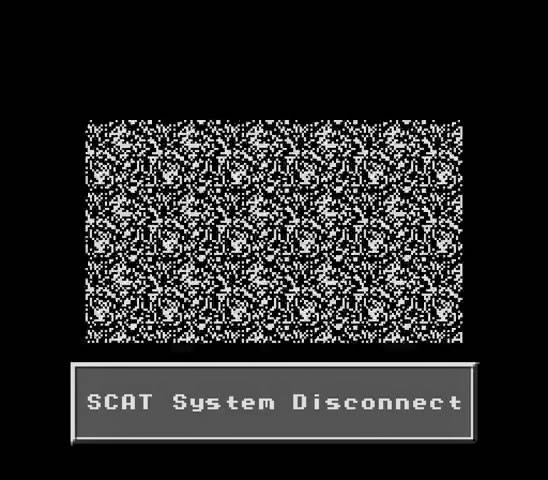
Speaking of Night Trap, I wonder if anybody working on that game seriously considered the name of the organization your character works for...


There wasn't a lot of support in terms of titles for the Sega CD. A lot of what was available wasn't all that great. Despite that I still have some nostalgia for the Sega CD. It sure didn't stop me from getting a Dreamcast or taking my friend's Saturn when he didn't want it anymore. But, I do remember feeling a bit burned after a little while of owning the Sega CD. I felt like a sucker.

My brother was an even bigger sucker. He bought the 32x. AFTER seeing my Sega CD.

Mid-October 2014 Desktop

I used to post desktop pix all the time. Today I'm only doing it because I made a new wallpaper that I find amusing.

Here's the full desktop "in action"...


And here it is with just one of the two screens (since the wallpaper is mirrored on both)...


If you want the wallpaper, you can grab it here.